RMISC Online Portal
-
HOW TO REDEEM A CODE
To redeem a coupon code issued for your course, please click on the button below. This will open a menu on the right-hand side and you will see a block called 'Coupon'. If you are an existing user, please login first and then enter your code in the box provided. If you don't already have an account, please click the 'Signup with a coupon code' button and complete the registration form and enter your coupon code.
PURCHASING A COURSE
If you would like to purchase one of the advertised courses, please click on the course at the bottom of this page, create an account (if you are a new user) and follow the on-screen instructions. Once you have purchased the course, you will be returned to this site and automatically enrolled.

Payments are processed using Stripe.
PURCHASING FUNDAMENTALS OF ON-BOARD DIAGNOSTICS COURSE FOR MULTIPLE CANDIDATES
If you would like to purchase one of the available courses for multiple candidates, please use the 'BOOK NOW' button below to submit your request.


Booking icon created by Flat Icons - Flaticon
-
ADDING NOTES
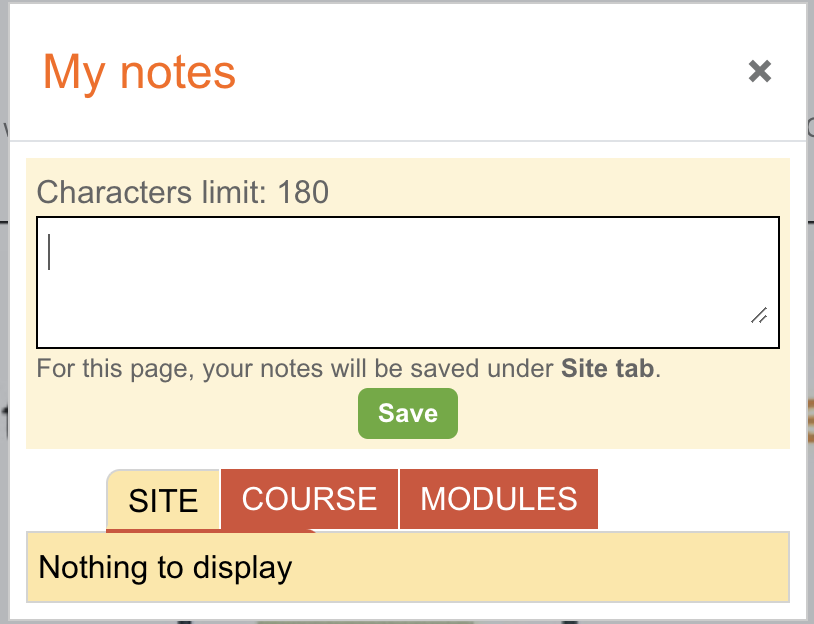 You can add notes from any page on this site. Notes can be added for the whole site or just linked to specific courses.
To add a note please click on this symbol
 at the bottom right hand side of the page.
This will open an editable box where you can add notes and select if you want them available across the whole site, at course level or just on the module you are working through.